GLM-5 code capability goes beyond simple code generation. With an OpenAI-compatible API, Function Calling support, parallel tool execution, and strong SWE-bench scores, GLM-5 is built for production coding workflows that require reliability, orchestration, and multi-step execution. This guide covers how to integrate GLM-5 code capabilities into your development pipeline and what to expect from real-world usage.
GLM-5 Code Performance Overview
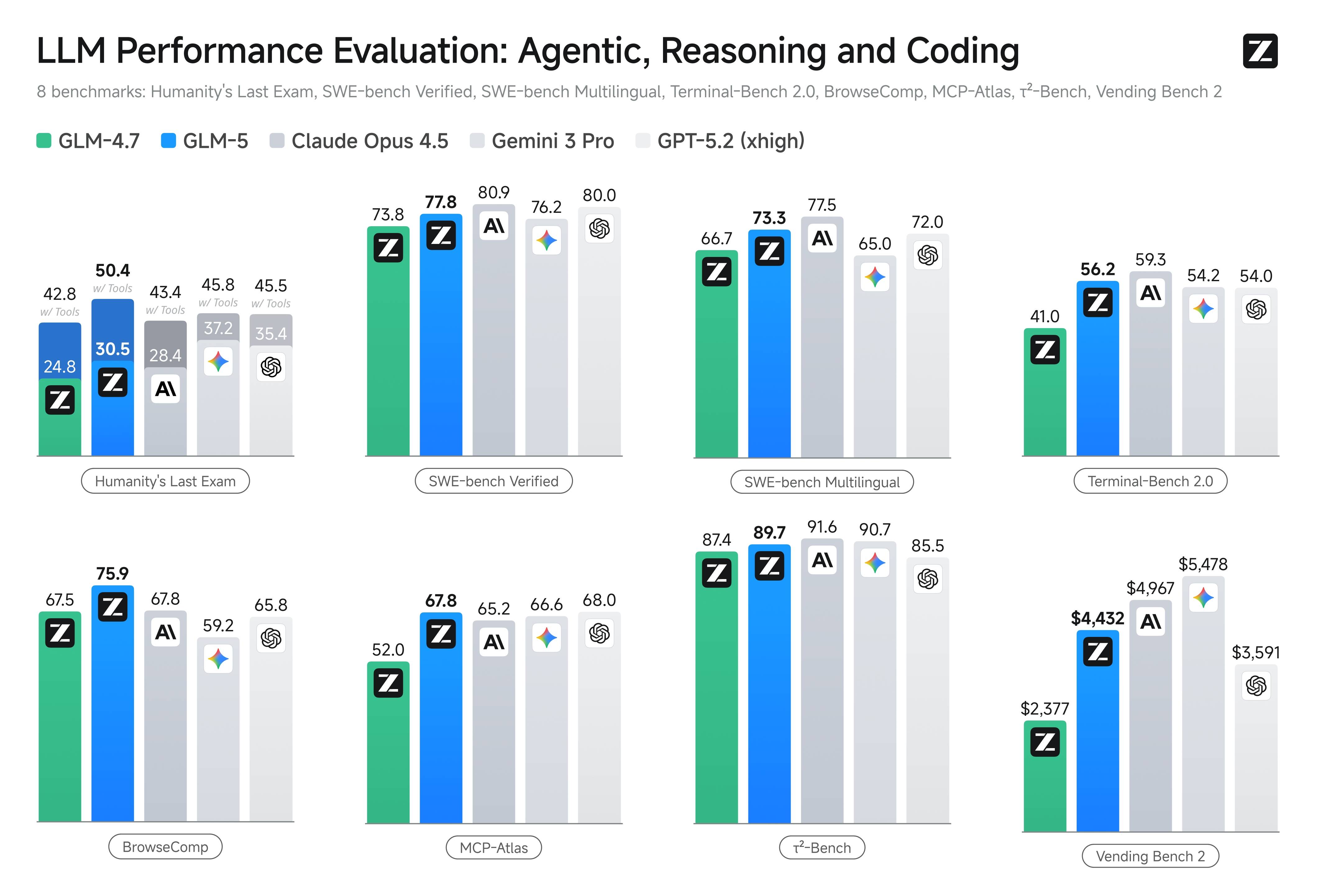
The GLM-5 model scores 77.8 on SWE-bench Verified, placing it among the top coding models available in 2026. For dedicated coding workloads, Zhipu AI also offers GLM-5-Code, a specialized variant optimized for software engineering tasks. The GLM-5 code performance extends across multiple dimensions:
- Code Repair: GLM-5 can identify and fix bugs in real-world codebases, as validated by the SWE-bench Verified benchmark
- Multilingual Coding: With a 73.3 score on SWE-bench Multilingual, GLM-5 handles Python, JavaScript, TypeScript, Java, Go, and other languages effectively
- Terminal Operations: A Terminal-Bench 2.0 score of 56.2 shows GLM-5 can compose and execute command-line workflows reliably
- Tool Orchestration: MCP-Atlas score of 67.8 demonstrates multi-step tool chaining capability essential for agentic coding workflows
Connecting to the GLM-5 API
The GLM-5 API is OpenAI-compatible, meaning you can use the standard OpenAI SDK with a modified base URL. Here is a basic GLM-5 code integration example in TypeScript:
import OpenAI from 'openai';

const client = new OpenAI({
  apiKey: process.env.ZAI_API_KEY,
  baseURL: 'https://api.z.ai/api/paas/v4/',
});

const completion = await client.chat.completions.create({
  model: 'glm-5',
  messages: [
    { role: 'system', content: 'You are a senior software engineer. Write clean, well-tested code.' },
    { role: 'user', content: 'Refactor this function to use async/await instead of callbacks.' },
  ],
  temperature: 0.1,
  max_tokens: 4096,
});

console.log(completion.choices[0]?.message?.content);
For Python developers, the GLM-5 code integration follows the same pattern:
from openai import OpenAI

client = OpenAI(
    api_key="your-zai-api-key",
    base_url="https://api.z.ai/api/paas/v4/"
)

response = client.chat.completions.create(
    model="glm-5",
    messages=[
        {"role": "system", "content": "You are a senior software engineer."},
        {"role": "user", "content": "Write unit tests for this authentication module."}
    ],
    temperature=0.1
)

print(response.choices[0].message.content)
GLM-5 Function Calling for Code Workflows
One of the most powerful GLM-5 code capabilities is Function Calling with parallel execution. This allows GLM-5 to invoke multiple tools simultaneously, which is critical for agentic coding workflows that need to read files, run tests, check logs, and make modifications in coordinated steps.
Here is a GLM-5 code example using Function Calling:
const tools = [
  {
    type: 'function',
    function: {
      name: 'read_file',
      description: 'Read the contents of a file',
      parameters: {
        type: 'object',
        properties: {
          path: { type: 'string', description: 'File path to read' }
        },
        required: ['path']
      }
    }
  },
  {
    type: 'function',
    function: {
      name: 'run_tests',
      description: 'Run test suite and return results',
      parameters: {
        type: 'object',
        properties: {
          test_path: { type: 'string', description: 'Test file or directory' }
        },
        required: ['test_path']
      }
    }
  }
];

const response = await client.chat.completions.create({
  model: 'glm-5',
  messages: [
    { role: 'user', content: 'Read the auth module and its tests, then suggest improvements.' }
  ],
  tools,
  tool_choice: 'auto'
});
GLM-5 can issue multiple function calls in a single response, enabling parallel file reads, concurrent test runs, and batched API queries. This parallel execution capability significantly reduces the latency of multi-step GLM-5 code workflows compared to sequential tool calling.
GLM-5 Code vs. GLM-5-Code Variant
According to the latest official pricing page, Zhipu AI offers a dedicated GLM-5-Code variant priced at $1.20 per million input tokens and $5.00 per million output tokens. The GLM-5-Code variant is specifically optimized for software engineering tasks and may produce higher quality output for complex refactoring, test generation, and architectural decisions.
When choosing between standard GLM-5 and GLM-5-Code for your coding workflows, consider these factors:
- Standard GLM-5 is more cost-effective for general coding tasks, code review, and documentation generation where the quality difference may be negligible
- GLM-5-Code is recommended for complex refactoring, multi-file changes, and tasks where first-pass accuracy directly impacts development velocity
- Lower-cost GLM family models can be used for development and testing environments where cost is the primary concern
Production Coding Workflow with GLM-5
For production GLM-5 code deployments, follow these reliability patterns:
Middleware Retries: Add retry logic at the middleware level for transient API errors. GLM-5 code requests may occasionally timeout during peak load, and automatic retries with exponential backoff prevent workflow interruption.
Output Validation: Validate GLM-5 code output before applying changes. Run linters, type checkers, and test suites against generated code to catch issues before they reach production.
Human Approval Gates: For irreversible operations like database migrations, deployment scripts, and infrastructure changes, gate GLM-5 code output behind human approval. While GLM-5 is highly capable, production-critical changes benefit from human review.
Context Management: For large codebases, carefully curate the context sent to GLM-5 rather than dumping entire repositories. The 200K context window is generous, but focused context produces better GLM-5 code output than unfocused dumps.
GLM-5 Code Pre-Launch Checklist
Before deploying GLM-5 code workflows to production, complete this evaluation checklist:
- Build a representative coding eval set covering bug fixes, refactoring, test generation, and documentation
- Run each task type against GLM-5 and your current model with identical prompts
- Track success rate, retry rate, latency, and per-task cost
- Validate Function Calling reliability across your specific tool definitions
- Test context window limits with your actual codebase sizes
- Verify output quality at different temperature settings for your use cases
- Measure end-to-end workflow latency including tool call round trips
This systematic evaluation will give you confidence in GLM-5 code capability for your specific engineering workflows and help identify any edge cases that require additional handling.